Built from inside practice. Built by Mr H Hammad FCCA, ACA, ICAEW Chartered Accountant and current CEO of a UK accountancy practice.
ProductFor ClientsClient PortalWhy BalansixPricingResourcesSupportBook a demoContact
BalansixYour client portal

Everything your accountant needs, without the email tennis.

Balansix gives you a secure place to send records, see what is outstanding, track your deadlines and talk to the people who look after your accounts — so you spend less time hunting for paperwork and more time running the business.

One secure placeNo software to installProvided by your accountant
Why it matters to you

Working with your accountant should not feel like admin.

Most business owners deal with their accountant through scattered emails, forgotten attachments and a annual scramble for records. The Balansix client portal replaces that with one place where everything lives and nothing gets lost.

Send records in seconds

Upload receipts, purchase invoices and bank statements from your phone or laptop, whenever they land.

Never miss a deadline

See your filing dates and what is due next, without waiting for a reminder email.

Ask a real person

Message the team who handle your accounts and get an answer against the right client record.

See your own numbers

Look at how the business is performing without asking your accountant to pull a report.

Send records

Take a photo. That is the whole job.

Receipts, purchase invoices and bank statements go straight into the portal, tagged to the right business and the right period. You do not need to name files, sort them into folders or remember which ones you have already sent.

The system reads what you upload and passes it through to the accounting workspace your accountant uses — so the same document you photographed becomes the entry in your books, with the original attached to it.

Sales invoices
Purchase invoices
Receipts and expenses
Bank statements
Upload straight from your phone
Confirmation that it arrived
No duplicates, no lost attachments
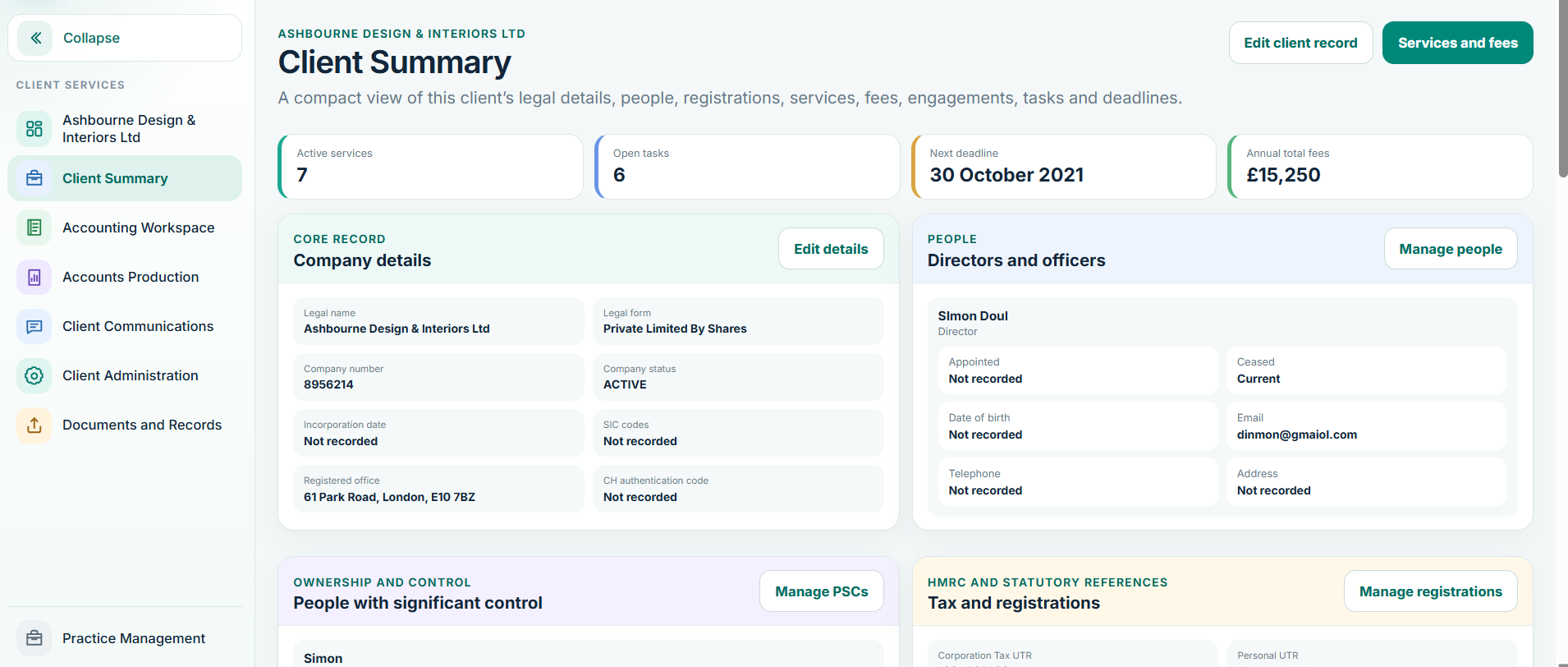
Balansix client portal summary showing uploaded records and outstanding requests
Client portal • live Balansix screen
Deadlines

Know what is due, and what is already done.

Your filing dates sit in one place rather than in your accountant’s system where you cannot see them. If something needs your attention, you will know before it becomes urgent.

You see

Your key dates

Year end, accounts filing, VAT periods and other obligations that apply to your business, in plain language.

You see

What is waiting on you

If the practice cannot progress without something from you, it shows as an open request rather than an email you may have missed.

You see

What is in hand

Work the practice is already dealing with is visible too, so you are not chasing something that is underway.

Requests and messages

Questions answered by the person who knows your file.

When the practice needs something — a missing invoice, an explanation for a payment, a confirmation — it comes through as a clear request rather than a vague email. You reply in the same place, and it stays attached to your record.

01

They ask

Your dedicated staff contact raises a specific request against your business.

02

You see it

It appears in your portal as an outstanding item, with the context of what it relates to.

03

You reply

Upload the document or answer the question directly, without composing an email.

04

It closes

The request clears once dealt with, so neither side is left wondering.

Your business details

Keep your own information right, without an email chain.

Company details, addresses, contacts and the sensitive information your accountant is required to hold can be reviewed and updated by you. Changes go to the practice for confirmation rather than being applied silently, so your record stays accurate and the practice keeps its professional controls.

Update as things change

New address, new contact, new bank details — change them yourself instead of hoping the message was picked up.

Held securely

Sensitive information is submitted through the portal rather than sent as an email attachment that sits in two inboxes forever.

Confirmed by the practice

Your accountant reviews changes to the details that matter, so nothing important is altered without a professional eye on it.

Secure by design

Better than emailing your bank statements.

Most businesses still send financial records as email attachments. Those attachments sit in sent folders, forwarded threads and personal devices indefinitely. The portal exists so that they do not have to.

Secure exchange

Documents stay in one controlled place

Records travel through the portal rather than through email, and remain attached to your business record.

Access control

You see your business, and only yours

Your access is limited to your own information. You never see the practice’s workspace or another client’s records.

UK hosted

Data held in the United Kingdom

Your information is hosted in the UK, which matters for both your accountant’s obligations and your own.

Common questions

What clients usually ask.

The questions business owners ask before their first login.

Do I need to install anything?

No. It runs in a web browser on a laptop, tablet or phone. There is nothing to download and nothing to keep updated.

Do I need to understand bookkeeping to use it?

Not at all. The portal is deliberately simpler than the workspace your accountant uses. You will not be asked about nominal codes, journals or reconciliations — that is their side of the work.

What happens to a receipt after I upload it?

It is passed through to the accounting workspace and posted against your records, with the original document kept attached to the entry. If anything is unclear, it is queued for a person to look at rather than guessed at.

Can I see how the business is doing?

Yes. Your accountant controls what is shared, and typically that includes a clear view of performance and position — without you needing to request a report each time.

Who replies when I send a message?

The staff at your accountancy practice who look after your file. Messages are attached to your business record, so whoever picks it up has the context.

My accountant does not use Balansix. Can I still have this?

The portal comes through your practice rather than directly. If you think your accountant would benefit, point them at this site — they can book a demonstration and see it on one of their own client files.

Ask your accountant about your portal.

If your practice already uses Balansix, ask them about setting up your access. If not, they are welcome to see how it works on one of their own client files.